Easiest way to install MCP Servers/Agents in Cursor.
What’s an MCP Server? 🤔
Think of MCP servers as your AI assistant’s superpowers. They’re like plugins that give your Cursor IDE extra abilities – from running Docker containers to searching the web, all without leaving your editor.
Update: As of September 2025, I am sad to report that I went back to Gmail. The search functionality in Proton Mail was not sufficient for my day-to-day work requirements. Hopefully I’ll go back to Proton mail in the future when search funcionality is better.
Why Leave Google?
Google’s motto has evolved from “Don’t be evil” to “Do the right thing,” but in the recent years, the company has abandoned these principles entirely. Through Project Nimbus, a $1.2 billion contract with the Israeli government, Google and Amazon are providing cloud computing and AI technology that directly supports Israel’s ongoing genocide in Gaza and apartheid regime in Palestine. Despite protests from their own employees, Google has chosen to:
Provide AI and cloud infrastructure enabling Israel’s military ongoing genocide
Suppress internal dissent and fire workers who speak out
Continue profiting from human rights violations
Enable surveillance and targeting systems used against Palestinian civilians
This is just one example of Google’s increasing complicity in human rights violations. For those who value privacy, human rights, and ethical technology, migrating away from Google’s ecosystem is an important step.
Moving from Gmail to ProtonMail? Here’s a simple guide to help you make the transition smoothly.
Why ProtonMail?
ProtonMail offers end-to-end encryption and enhanced privacy features, making it a popular choice for those looking to switch from Gmail. Their data centres are in Switzerland, and your emails, your data, is protected by the laws of one of the most privacy focused countries in the world. The migration process is straightforward, and we’ll guide you through it.
For visual guides, check out these helpful video tutorials:
Complete Migration Guide:
Understanding the Migration Process
The above steps help you migrate your existing emails from Gmail to ProtonMail. However, to ensure a smooth transition without losing any new emails, follow this two-phase approach:
Phase 1: Initial Email Migration
Use the Easy Switch tool as described above to transfer your existing emails
This creates a foundation with all your historical emails in ProtonMail
Phase 2: Gradual Transition
Set up email forwarding from Gmail to ProtonMail (see video below)
Begin updating your email address across various services:
Start with critical accounts (banking, government, work)
Then move to regular subscriptions and newsletters
Finally, notify personal contacts
Monitor both accounts during the transition period
As more services switch to your ProtonMail address, your dependency on Gmail forwarding will decrease
This methodical approach ensures:
No emails are lost during or after migration
You have time to update all your accounts
A smooth transition without disrupting your communication
Setting Up Email Forwarding:
Need Help?
If you encounter any issues during the migration, ProtonMail’s support team is available to help. You can also refer to their official migration guide for detailed instructions.
Remember to take your time with the migration process to ensure all your important emails and contacts are properly transferred.
Further Reading
For more information about Google’s involvement in human rights violations and why many are choosing to leave Google’s ecosystem:
Building an Urban Mobility Dashboard with AI as Your Thought Partner
I wanted to share something cool I built this morning – an Urban Mobility Dashboard that helps city planners visualize and analyze mobility patterns using Google Maps. What’s even cooler? I built it in just 60 minutes with the help of Cursor AI!
About the Dashboard
The dashboard lets you:
Select different cities (Vancouver, Madinah, Delhi, Lahore) or search for any location
View simulated crowd density using heatmaps
Analyze cultural sites and specific areas with interactive markers
Compare day/night activity patterns
View key mobility statistics like peak hours and estimated visitor counts
It’s built with Next.js, TypeScript, Tailwind CSS, and the Google Maps API – a modern stack that makes it responsive and user-friendly.
Here’s the real game-changer: I made a 12-minute video showing how I used Cursor (or any AI coding assistant) not just as a code generator, but as a true “thought partner” in development.
Instead of the typical approach of asking AI to fix small issues with individual prompts, I had an actual conversation with it to tackle bigger challenges. The key was prompting the AI to ask me questions and then answering those questions to guide the development process.
The first 2.5 minutes of my video showcase the finished app (which took just 60 minutes to build), while the remaining 10 minutes (condensed from 35-40 minutes of actual work) demonstrate the specific prompts and workflow I used.
Why This Approach Works
When you use AI as a thought partner:
You can tackle complex projects much faster
The AI helps you think through architecture decisions
You avoid getting stuck on implementation details
The back-and-forth conversation creates a more coherent codebase
The next time you’re starting a project, try treating your AI assistant as a thought partner rather than just a code generator. Ask it big-picture questions, let it suggest approaches, and have it ask you clarifying questions. You might be surprised at how much more productive you become!
When managing AWS infrastructure, it’s often crucial to have a clear overview of all IP addresses and endpoints within your Virtual Private Cloud (VPC). With literally just one simple prompt, Cursor created a helpful bash script that provides a comprehensive view of all network-related resources in a VPC.
This video covers whiteboarding for IT Professionals using Drawing Tablets. It is particularly focused on IT professionals such as, but not limited to: Cloud Engineers, DevOps Engineers, Network Engineers, Developers, DB Administrators, IT Architects, and virtually all other IT professionals. Using drawing tablets combines the best of digital and analog whiteboarding. Give this method a try – you may find that doing so will take your whiteboarding to the next level, improve business and customer outcomes, save you time, and at the same time, help you better establish yourself as an expert or trusted advisor in front of your colleagues or customers.
This Terraform based solution automatically sets retention periods for CloudWatch Log Groups as they’re created across your entire AWS organization. No more manual cleanup or forgetting to set retention periods! Just deploy it once in your management account and forget about it. Made this solution in about 8 hours thanks to Cursor – The AI Code Editor !
Asking ChatGPT and DeepSeek.ai (DieticienGPT?) about what diet is best for reducing Cardiovascular Disease – just want to store it here to keep it handy:
Here was the prompt:
can you please provide list of 10 meta analysis studies in a table that show what the best diet is for reducing cardiovascular disease? please include publication date, authors, journal, title of the study and summary of the studies. Please also include low-carb diet meta analysis. Please also include the URL for each study in the table as well. Only focus on studies that talk about cardiovascular disease as the main target of their analysis.
This is great to test out CloudFront CDN integration with WordPress on AWS. Bunch of other scripts I found required owning a domain name and other inputs. This is just a simple script to get you started. Just simply run “terraform init” and “terraform apply” and you’re good to go!
Before running the script, the only three things you need to provide are:
AWS Access Key
AWS Secret Key
Key Pair Name
All the other variables are optional and you can change them to your liking.
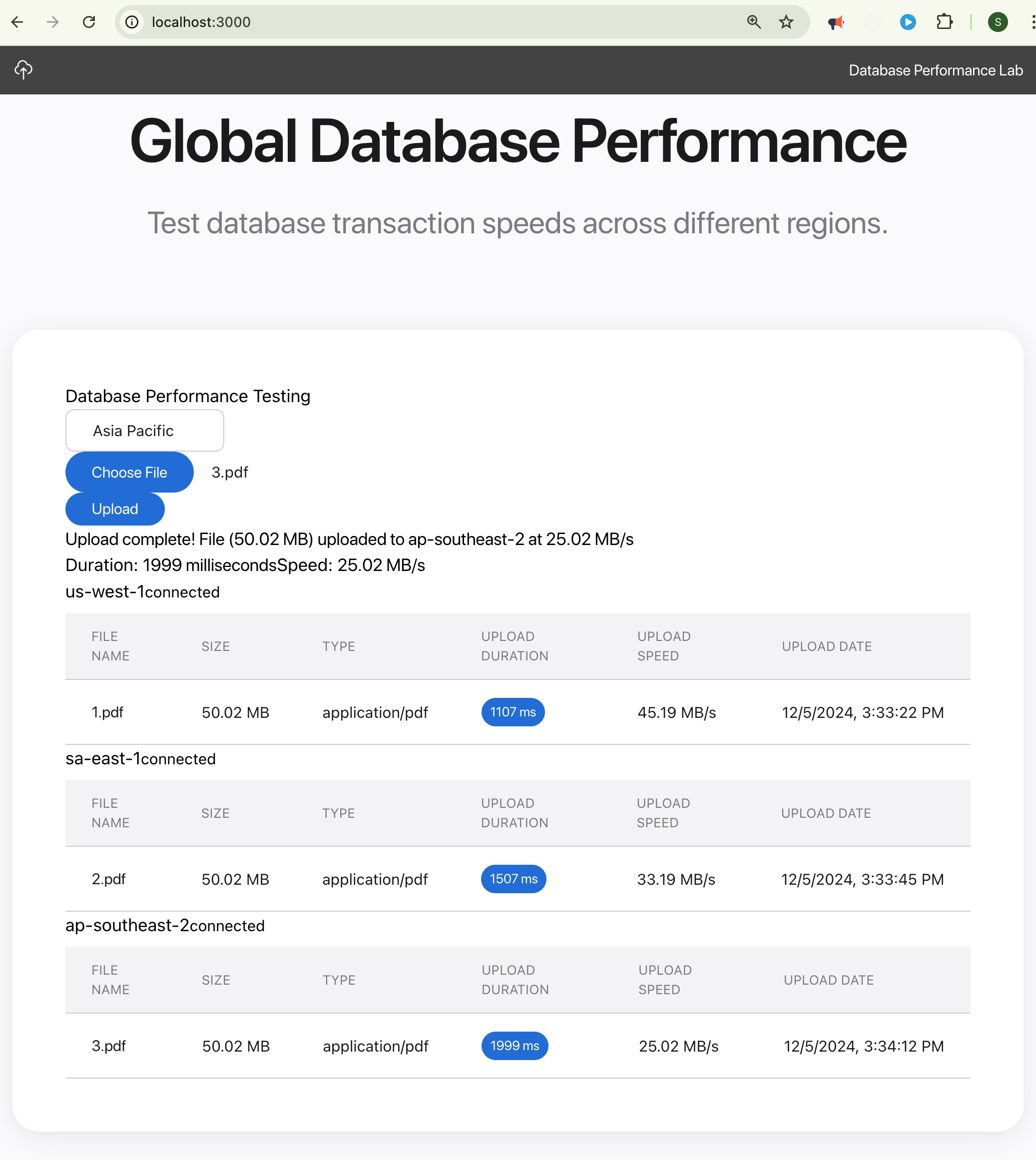
My team is building an application that needs to scale to 10,000s of users – but not millions. Accordingly, we can’t necessarily follow SaaS models/best practices meant for scaling to millions of users as that would be overkill and not cost efficient.
One architecture we came up with involves compute in one region with serverless RDS databases deployed in different regions due to data residency/compliance requirements. Of course, generally, you never want applications to be too far away from their databases – definitely not continents apart! But that’s part of our literal requirement.
So to test to make sure our application will be able to have adequate database performance even with databases deployed literally in other continents, I built the Global DB Performance Tester using Cursor AI
Figma is an awesome tool for creating diagrams, designs, real-time collaboration, whiteboarding, and so much more. For any cloud engineers new to Figma, here is a quick way to get started.
I am assuming your team is already using Figma. To make Cloud related diagrams, simply click on the tools section near the bottom right: