So You’re Terraforming Your First EC2 + S3 Bucket? Cool, Let’s Go

You’ve got AWS credentials exported in your shell (AWS_ACCESS_KEY_ID, AWS_SECRET_ACCESS_KEY, maybe AWS_SESSION_TOKEN if you’re on temp creds). Terraform will just pick those up automatically — no need to hardcode anything. Good, let’s not do that ever.

1. Make a folder, make a file

mkdir my-first-tf && cd my-first-tf
touch main.tf

2. Tell Terraform which cloud and region

provider "aws" {
region = "us-west-2"
}

That’s it. No access keys in the file — it reads them from your environment.

3. Spin up an EC2 instance

resource "aws_instance" "my_first_ec2" {
ami = "ami-0c101f26f147fa7fd" # Amazon Linux 2023, us-west-2
instance_type = "t2.micro"
tags = {
Name = "my-first-terraform-box"
}
}

AMI IDs are region-specific. If you’re not in us-east-1, grab the right one from the AWS console (EC2 → Launch Instance → copy the AMI ID before hitting launch).

4. Create an S3 bucket

resource "aws_s3_bucket" "my_first_bucket" {
bucket = "my-first-tf-bucket-change-this-name-12345"
}

Bucket names are globally unique across all of AWS, so my-bucket is taken. Add your name, a random number, whatever — just make it unique.

5. The magic three commands

terraform init # downloads the AWS provider plugin
terraform plan # shows you what it's ABOUT to do (read this!)
terraform apply # actually does it (type "yes" when prompted)

init only needs to run once per project (or when you add new providers). plan and apply are your daily drivers.

6. Check your work

terraform show

Or just go look in the AWS console — your instance and bucket should be sitting there.

7. Clean up (seriously, do this)

terraform destroy

EC2 instances and S3 buckets cost money if left running. Don’t be the person who leaves a t2.micro running for six months and gets a surprise bill.

Quick tips before you go

  • Never commit .tfstate files to git — they can contain sensitive data.
  • Add a .gitignore with .terraform/, *.tfstate, *.tfstate.backup.
  • Run terraform fmt to auto-format your files so they don’t look like a mess.
  • If plan shows something you didn’t expect, stop and read it again before apply. Terraform does exactly what you tell it to, including deleting things.

That’s the whole loop: initplanapplydestroy. Everything else is just more resources.

The Meritocracy Blueprint: Why an Impeccable Resume Beats a Great Network

Over the past 14 years, I have had the privilege of mentoring and helping more than 500 professionals rewrite their resumes, optimize their LinkedIn profiles, and secure better roles in the corporate landscape. I have done this entirely for free, driven by a desire to see talented individuals succeed on their own merits.

Throughout this journey, I have consistently encountered one pervasive, highly damaging myth: the belief that a personal reference or an inside connection is an absolute requirement to land a great job in North America.

I call this The Reference Fallacy.

No matter how robust your professional circle is, a network alone will not secure a top-tier role at major organizations like Amazon, Cisco, Google, Deloitte, or the University of Toronto. Securing a position in the modern corporate market requires shifting focus away from who you know and redirecting it toward what you can prove. Based on over a decade of empirical data, the ideal allocation of job-seeking energy isn’t heavily weighted toward networking, it should be split 90% on optimizing your resume and interview skills, and just 10% on networking.

Rooting Out the Misconception

The false belief that inside references govern hiring is frequently inherited from environments where nepotism, favoritism, or systemic bribery are common corporate practices. We see this play out clearly within specific cultural cohorts, for instance, within the South Asian community, there is a deep-seated assumption that without an internal advocate, an application is futile. As a Pakistani Canadian, I know that in Pakistan, references are essential for gaining many of not most good jobs.

While born out of real experiences in other markets, carrying this mindset into the Canadian and American job markets is a profound disservice to job seekers. It misdirects critical energy away from the areas that actually yield results.

In North America, major organizations operate under rigid compliance frameworks, strict anti-nepotism regulations, and aggressive market pressures. Hiring managers have a powerful, pragmatic motivation to hire the absolute best candidate: their own professional reputation and the financial growth of their business are on the line. If a manager hires an unqualified friend or relative who underperforms, that manager risks losing the trust of their superiors and stalling their own career advancement.

The Reality of Modern, Panel-Driven Hiring

To understand why a resume takes precedence over a relationship, one must look at the mechanics of the modern hiring pipeline.

Long before an application ever reaches a human decision-maker, it faces the reality of automated infrastructure. Today’s corporate ecosystem heavily utilizes sophisticated candidate ranking platforms and AI-driven screening tools – including one that I am building myself: https://hirebetterfaster.com/. These systems evaluate applications purely on data – keywords, structural alignment, skill density, and core competencies. An inside connection cannot force an unranked, poorly constructed resume past an automated gatekeeper.

Furthermore, for intermediate, advanced, and expert roles, individual hiring autonomy is virtually non-existent. The vast majority of reputable companies employ a panel or committee-based hiring process. Decisions are made collectively by a cross-functional group typically consisting of the hiring manager, a department director, and human resources.

This multi-layered structure is intentionally engineered to eliminate individual bias, favoritism, and nepotism. In a panel setting, an inside reference carries minimal weight. The panel demands objective proof of competence, which can only be demonstrated through a flawless resume and an exceptional interview performance.

Reallocating Your Effort: The 90/10 Rule

Businesses that rely strictly on internal circles to scale remain small, insulated, and highly vulnerable to competitors who source talent globally. To thrive, companies must run as meritocracies. To win within that system, your preparation must mirror that reality.

If you are currently dividing your job-hunting efforts, rebalance your strategy immediately:

  • The 10% (Strategic Networking): Maintain professional visibility, keep your LinkedIn profile active, and build genuine industry relationships. A reference can occasionally help ensure your document is seen.
  • The 90% (The Core Mechanics): Spend the vast majority of your time building concrete skills, documenting your work through a professional blog or portfolio, refining your resume into an impactful, metrics-driven document, and mastering the art of behavioral and technical interviews (free resources here).

A compelling resume and crisp communication skills open doors that no personal connection can replicate. Do not let the reference fallacy cause you to neglect the very tools that guarantee your advancement. Focus on your merit, master your presentation, and let your qualifications dictate your success.

To assist you through this process, I have made my proven resume methodologies and interview strategies available completely free of charge. You can access my comprehensive resume advice and download my step-by-step interview preparation guidebook directly at linktr.ee/acetheinterview.

How to Use Thaura AI with Cursor: An Ethical Alternative to Big Tech

If you’re like me and looking for ethical alternatives to the big tech AI services, you’re going to love this. Thaura.AI is an amazing alternative that respects your privacy and doesn’t sell your data to corporations.

Why Thaura AI?

Before we dive into the setup, let me tell you why Thaura AI is awesome:

  • Privacy-first: Your data stays yours – no selling to big tech companies
  • Ethical AI: Built with responsible AI principles in mind
  • Compatible: Works seamlessly with tools like Cursor that support OpenAI-compatible APIs

Pre-Step: Get Your Thaura API Key

First things first, you need to get your API key from Thaura:

  1. Go to Thaura.AI and create an account if you haven’t already
  2. Navigate to your dashboard and find the API key section
  3. Copy your API key – you’ll need this for the next steps

Step 1: Open Cursor Settings

Once you have your API key ready, open Cursor and let’s get started:

  1. Open Cursor IDE
  2. Go to Settings (you can use Cmd+, on Mac or Ctrl+, on Windows/Linux)
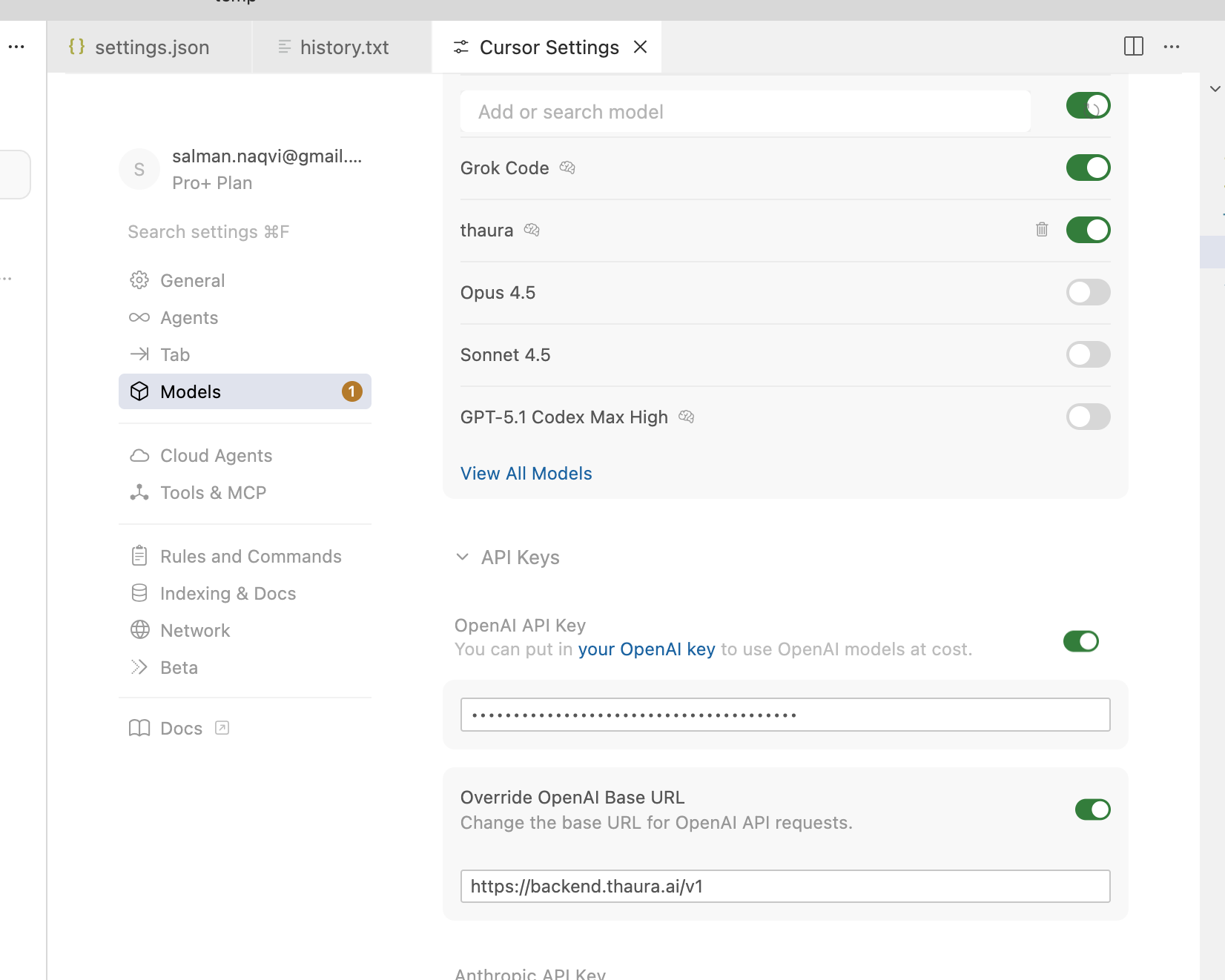
  3. Look for the API Keys section under the OpenAI settings

Step 2: Add Your Thaura API Key

This is where the magic happens! Since Thaura AI uses an OpenAI-compatible API, you can add it right in the same section:

  1. In the OpenAI API Key section, paste your Thaura API key
  2. Make sure the base URL is set to https://backend.thaura.ai/v1 (this is important!)
  3. Save the settings

Step 3: View All Models

Now let’s add the Thaura model to your available options:

  1. Go back to the main settings
  2. Look for Models or Model Settings
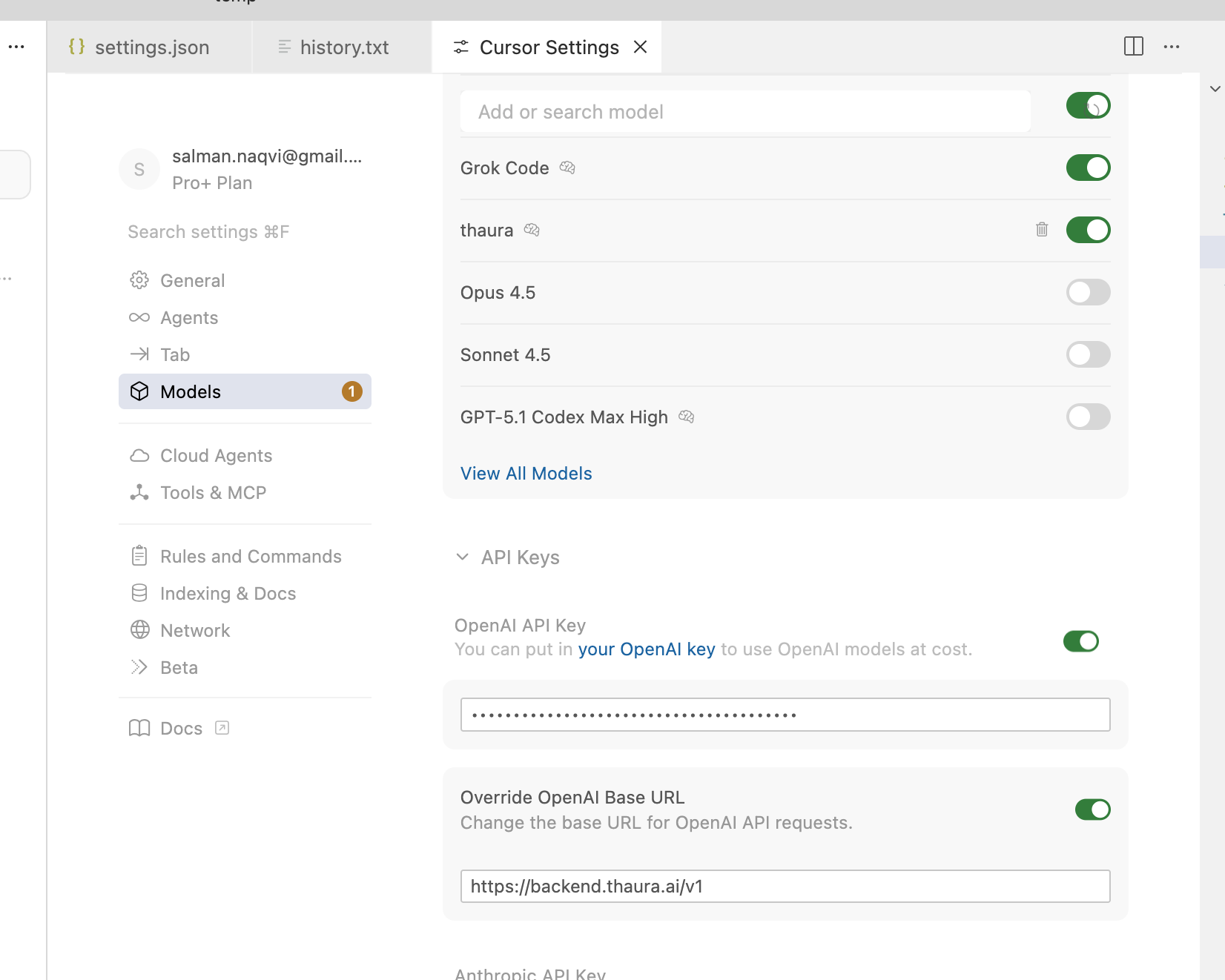
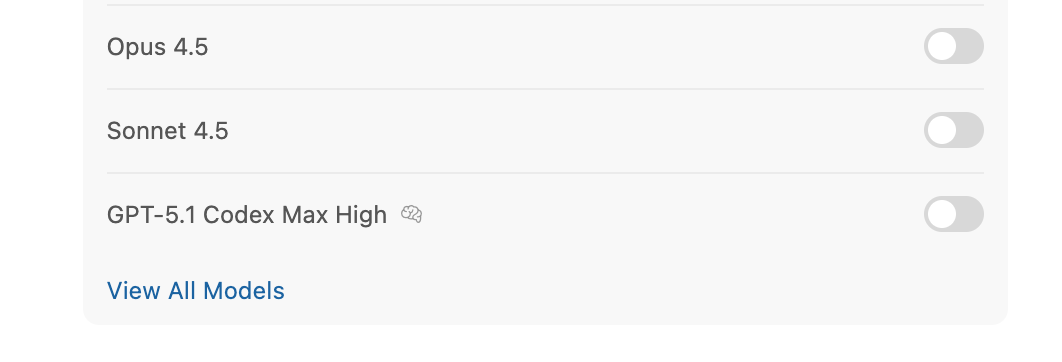
  3. Click on “View All Models”

Step 4: Add Custom Model

Time to add Thaura as a custom model:

  1. Click on “Add Custom Model”
  2. You’ll see a dialog box asking for the model name
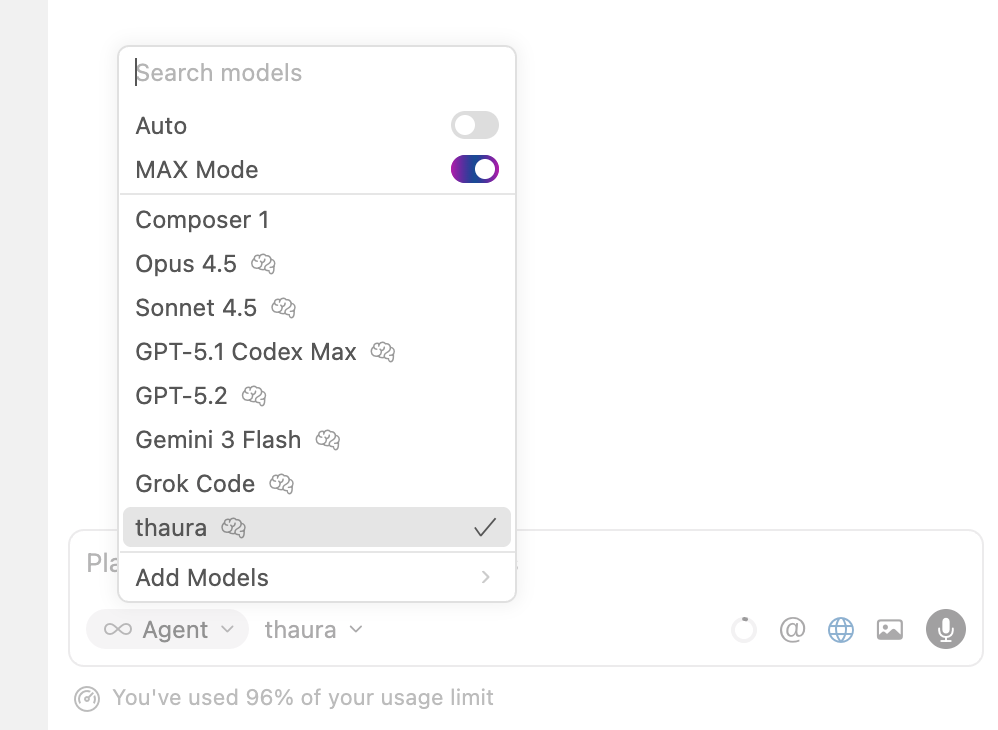
  3. Type thaura (all lowercase, no quotes) in the model name field
  4. Click “Add” to save it

Step 5: RESTART CURSOR

I can’t stress this enough – you MUST restart Cursor for the changes to take effect. This is a common step that people often forget, but it’s crucial for the new model to be recognized.

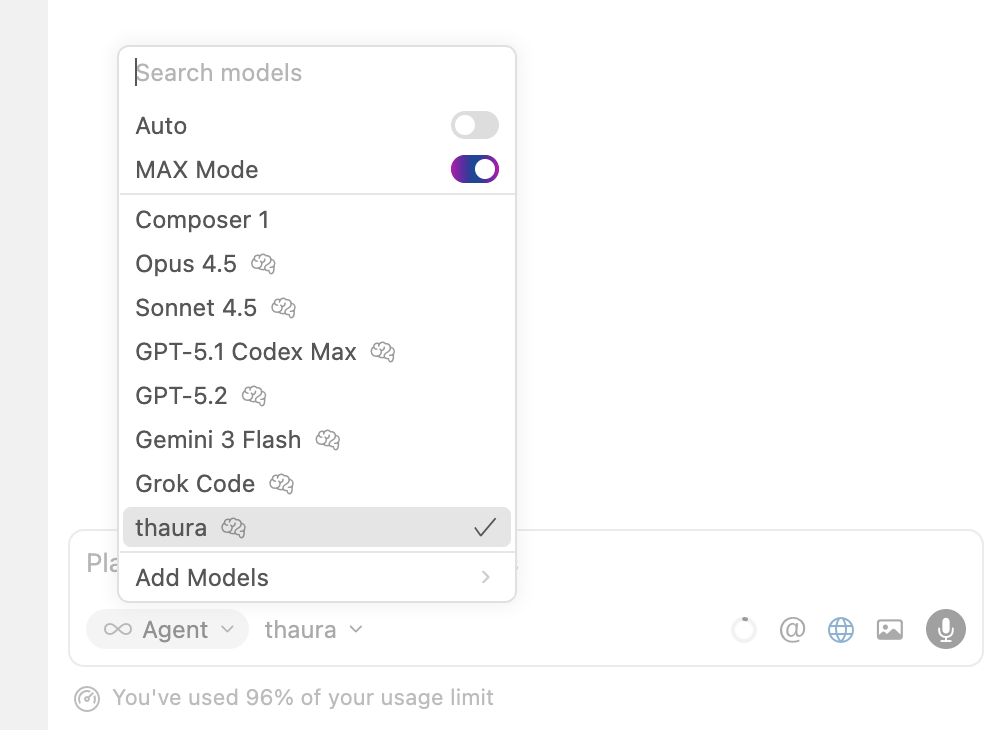
Step 6: Start a new chat using “New Agent” button

Now for the fun part! Let’s create a new agent using Thaura:

  1. Click on “New Agent” in Cursor
  2. When the model selection appears, choose “thaura” from the list
  3. Give your agent a name if you want (optional)
  4. Create the agent

Step 7: Test Your New Thaura Agent

Let’s give it a test run to make sure everything works:

  1. Open any file or create a new one
  2. Type a test prompt like:Can you help me write a simple JavaScript function that adds two numbers?
  3. Hit Enter and watch Thaura AI in action!

Setting up Thaura AI with Cursor is super easy and totally worth it. You get all the benefits of AI coding assistance without the privacy concerns that come with big tech services. Plus, you’re supporting ethical AI development!

Give it a try and let me know how it works for you. Happy coding!


Same steps as above, but showing screenshots (Cursor change UI often so this might look a little different within a few months).

*Made with Cursor.com AI IDE* Urban Mobility Dashboard – Made in 60 min!

Building an Urban Mobility Dashboard with AI as Your Thought Partner

I wanted to share something cool I built this morning – an Urban Mobility Dashboard that helps city planners visualize and analyze mobility patterns using Google Maps. What’s even cooler? I built it in just 60 minutes with the help of Cursor AI!

About the Dashboard

The dashboard lets you:

  • Select different cities (Vancouver, Madinah, Delhi, Lahore) or search for any location
  • View simulated crowd density using heatmaps
  • Analyze cultural sites and specific areas with interactive markers
  • Compare day/night activity patterns
  • View key mobility statistics like peak hours and estimated visitor counts

It’s built with Next.js, TypeScript, Tailwind CSS, and the Google Maps API – a modern stack that makes it responsive and user-friendly.

Read more: *Made with Cursor.com AI IDE* Urban Mobility Dashboard – Made in 60 min!

How I Built It: The “Thought Partner” Approach

Here’s the real game-changer: I made a 12-minute video showing how I used Cursor (or any AI coding assistant) not just as a code generator, but as a true “thought partner” in development.

Instead of the typical approach of asking AI to fix small issues with individual prompts, I had an actual conversation with it to tackle bigger challenges. The key was prompting the AI to ask me questions and then answering those questions to guide the development process.

The first 2.5 minutes of my video showcase the finished app (which took just 60 minutes to build), while the remaining 10 minutes (condensed from 35-40 minutes of actual work) demonstrate the specific prompts and workflow I used.

Why This Approach Works

When you use AI as a thought partner:

  1. You can tackle complex projects much faster
  2. The AI helps you think through architecture decisions
  3. You avoid getting stuck on implementation details
  4. The back-and-forth conversation creates a more coherent codebase

Want to Try It?

Check out my GitHub repo at github.com/main-salman/mobility-dashboard to see the code and play with the app yourself!

The next time you’re starting a project, try treating your AI assistant as a thought partner rather than just a code generator. Ask it big-picture questions, let it suggest approaches, and have it ask you clarifying questions. You might be surprised at how much more productive you become!

Happy coding!

Make a Web Application from scratch with CURSOR – no development experience needed!

My awesome friend Dipto Biswas introduced me to the world of AI development – and I am totally hooked!

Anyone can make web applications, and so much more, using AI, with no programming / development experience required! And you can actually make stuff that’s useful – not just basic “hello world” type beginer tutorials.

In this video, I make an app that can summarize a list of all AWS resources in a particular AWS account. You can make whatever you want using the same process. Make a 3D Pong game. Make an app that can remove background from images. Make an app that shows what the stars look like on a particular night based on latitude and longitude. Or whatever else your imagination thinks of! Here are the tools and accounts you need:

Cursor – The AI Code Editor

Vercel

GitHub

Install WSL | Microsoft Learn

Install Ubuntu on WSL2 – Ubuntu WSL documentation

How To Install Node.js on Ubuntu 20.04 | DigitalOcean (I referred to this part as NPM in the video)

Go nuts!

Blog at WordPress.com.

Up ↑