
So, in this post, we are repeating what we did in the last post, and further builds on it, but, via Crossplane!
It seems that Crossplane is still somewhat early in its adoption curve at the time of writing (July 2024), because examples of deploying AWS services like Lambda, Eventbridge, and Systems Manager are not widely available. The Crossplane documentation is lacking examples, and in too many cases, just wrong.
One such example is highlighted below. Crossplane does not allow passing parameters as shown below. In the Crossplane template seen below, you’ll notice that you either have to actually hard code these variables, or, use Composite Resource Definitions (XRDs), but, following the example as is simply would not work.

In other cases, it’s simply not clear what format the input is expected in. Figuring this out basically required trial and error until I got it right:

The right format required was:
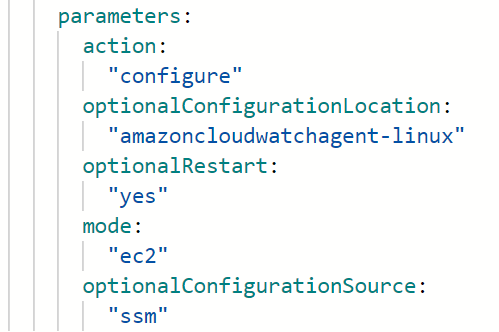
Here is the full code. Please pay attention to the comments for successful implementation:
# Note System Manager has to be enabled with the EC2-Default-SSM-AD-Role role. Go to Systems Manager > Fleet Manager > Configure Default Host Management Configuration, and then change the IAM role to EC2-Default-SSM-AD-Role

# Also note that EC2 instances must be associated with IAM Role EC2-Default-SSM-AD-Role
# If this role doesn't already exist in your environment, then you can create it by adding these built in AWS managed policies: AmazonSSMDirectoryServiceAccess, AmazonSSMManagedInstanceCore, CloudWatchAgentServerPolicy

# Permissions to allow EventBridge service to invoke a Lambda Function.
---
apiVersion: lambda.aws.upbound.io/v1beta1
kind: Permission
metadata:
  name: alloweventbridgetoinvokefunction
spec:
  forProvider:
    action: lambda:InvokeFunction
    functionNameRef:
      name: autotagec2os
    principal: events.amazonaws.com
    region: ca-central-1
    statementId: AllowExecutionFromEventBridge

# Lambda function to automatically tag EC2 instances with monitoring:disk-memory:linux or monitoring:disk-memory:windows tag
---
apiVersion: lambda.aws.upbound.io/v1beta1
kind: Function
metadata:
  annotations:
    #meta.upbound.io/example-id: lambda/v1beta1/function
    uptest.upbound.io/timeout: "3600"
  labels:
    testing.upbound.io/example-name: autotagec2os
  name: autotagec2os
spec:
  forProvider:
    handler: lambda_function.lambda_handler
    packageType: Zip
    region: ca-central-1
    roleSelector:
      matchLabels:
        testing.upbound.io/example-name: autotagec2os-role
    runtime: python3.12
    s3Bucket: salman-temp-delete-after-aug-2024
    s3Key: autoTagEC2OS.zip
    timeout: 60

# The autoTagEC2OS.zip has a single file named lambda_fucntion.py. Below are the contents of that file:
#import boto3
#def lambda_handler(event, context):
#    ec2 = boto3.client('ec2')
#    instances = ec2.describe_instances()
#    for reservation in instances['Reservations']:
#        for instance in reservation['Instances']:
#            os_tag = 'unknown'
#           for tag in instance.get('Tags', []):
#                if tag['Key'] == 'os':
#                    os_tag = tag['Value']
#                    break
#            if os_tag == 'unknown':
#                # Determine the OS and tag the instance
#                platform = instance.get('Platform', 'linux')
#                if platform == 'windows':
#                    os_value = 'windows'
#                else:
#                    os_value = 'linux'
#
#                ec2.create_tags(
#                    Resources=[instance['InstanceId']],
#                    Tags=[{'Key': 'monitoring:disk-memory', 'Value': os_value}]
#                )

# This defines the Eventbridge target to be the lambda function created above. Note, the account ID and region have to be changed manually.
---
apiVersion: cloudwatchevents.aws.upbound.io/v1beta1
kind: Target
metadata:
  annotations:
    upjet.upbound.io/manual-intervention: This resource needs arn of Topic.
  name: autotagec2os-lambdatarget
spec:
  forProvider:
    #arn: arn:aws:lambda:${data.aws_region}:${data.aws_account_id}:function:autotagec2os
    arn: arn:aws:lambda:ca-central-1:[YOUR-ACCOUNT-NUMBER]:function:autotagec2os
    eventBusName: default
    region: ca-central-1
    ruleSelector:
      matchLabels:
        testing.upbound.io/example-name: autotagec2os-eventrule
    targetId: autotagec2os-lambdatarget


# This is the EventBridge rule that defines when the event gets triggered, in this case, whenever an EC2 instance gets created by watching the EC2 instance state change.
# Technically, just watching the "pending" should be enough, but, "runnning" state has been also added as a good measure
# There may be room to improve this Event Rule, by watching some other EC2 parameter. There may however be no need to change this as this works well enough.
---
apiVersion: cloudwatchevents.aws.upbound.io/v1beta1
kind: Rule
metadata:
  name: autotagec2os-eventrule
  labels:
    testing.upbound.io/example-name: autotagec2os-eventrule
spec:
  forProvider:
    eventBusName: default
    eventPattern: |
      { "source": ["aws.ec2"],  "detail-type": ["EC2 Instance State-change Notification"],  "detail": {    "state": ["running", "pending"]  }}
    region: ca-central-1

# Associations appear under the "State Manager" section of the Systems Manager.
# This association installs CloudWatch Agent on the instances with tag os:linux or os:windows (which is added automatically using Lambda above)
# Note, the instances must also have the IAM Role EC2-Default-SSM-AD-Role, otherwise they won't have SSM permissions
# Systems Manager is idempotent, so any instances that already have Cloudwatch Agent won't get it reinstalled

---
apiVersion: ssm.aws.upbound.io/v1beta1
kind: Association
metadata:
  labels:
    testing.upbound.io/example-name: install-cloudwatch-daily
  name: install-cloudwatch-daily
spec:
  forProvider:
    associationName: install-cloudwatch-daily
    #document name below
    name: AWS-ConfigureAWSPackage
    nameRef:
      name: AWS-ConfigureAWSPackage
      policy:
        resolution: Optional
    region: ca-central-1
    targets:
      - key: tag:monitoring:disk-memory
        values: ["linux", "windows"]
    scheduleExpression: "rate(30 minutes)"
    parameters:
      action:
        "Install"
      name:
        "AmazonCloudWatchAgent"
      additionalArguments:
        "{}"
      installationType:
        "Uninstall and reinstall"

# This association configures the Windows Cloudwatch Agent using the config file in Systems Manager Parameter store named amazoncloudwatchagent-windows
# This template includes the creation of these Parameter further below in the document
---
apiVersion: ssm.aws.upbound.io/v1beta1
kind: Association
metadata:
  labels:
    testing.upbound.io/example-name: configure-cloudwatchagent-windows-daily
  name: configure-cloudwatchagent-windows-daily
spec:
  forProvider:
    associationName: configure-cloudwatchagent-windows-daily
    #document name below
    name: AmazonCloudWatch-ManageAgent
    nameRef:
      name: AmazonCloudWatch-ManageAgent
      policy:
        resolution: Optional
    region: ca-central-1
    targets:
      - key: tag:monitoring:disk-memory
        values: ["windows"]
    scheduleExpression: "rate(30 minutes)"
    parameters:
      action:
        "configure"
      optionalConfigurationLocation:
        "amazoncloudwatchagent-windows"
      optionalRestart:
        "yes"
      mode:
        "ec2"
      optionalConfigurationSource:
        "ssm"


# This association configures the Linux Cloudwatch Agent using the config file in Systems Manager Parameter store named amazoncloudwatchagent-linux
# This template includes the creation of these Parameter further below in the document
---
apiVersion: ssm.aws.upbound.io/v1beta1
kind: Association
metadata:
  labels:
    testing.upbound.io/example-name: configure-cloudwatchagent-linux-daily
  name: configure-cloudwatchagent-linux-daily
spec:
  forProvider:
    associationName: configure-cloudwatchagent-linux-daily
    #document name below
    name: AmazonCloudWatch-ManageAgent
    nameRef:
      name: AmazonCloudWatch-ManageAgent
      policy:
        resolution: Optional
    region: ca-central-1
    targets:
      - key: tag:monitoring:disk-memory
        values: ["linux"]
    scheduleExpression: "rate(30 minutes)"
    parameters:
      action:
        "configure"
      optionalConfigurationLocation:
        "amazoncloudwatchagent-linux"
      optionalRestart:
        "yes"
      mode:
        "ec2"
      optionalConfigurationSource:
        "ssm"


# This is the Systems Manager Parameter (basically a long string/text file) used to configure Windows Cloudwatch Agent
---
apiVersion: ssm.aws.upbound.io/v1beta1
kind: Parameter
metadata:
  labels:
    testing.upbound.io/example-name: amazoncloudwatchagent-windows
  name: amazoncloudwatchagent-windows
spec:
  forProvider:
    region: ca-central-1
    type: String
    insecureValue: |
      {
        "metrics": {
                "aggregation_dimensions": [
                        [
                                "InstanceId"
                        ]
                ],
                "append_dimensions": {
                        "AutoScalingGroupName": "${aws:AutoScalingGroupName}",
                        "ImageId": "${aws:ImageId}",
                        "InstanceId": "${aws:InstanceId}",
                        "InstanceType": "${aws:InstanceType}"
                },
                "metrics_collected": {
                        "LogicalDisk": {
                                "measurement": [
                                        "% Free Space"
                                ],
                                "metrics_collection_interval": 60,
                                "resources": [
                                        "*"
                                ]
                        },
                        "Memory": {
                                "measurement": [
                                        "% Committed Bytes In Use"
                                ],
                                "metrics_collection_interval": 60
                        }
                }
        }
      }

# This is the Systems Manager Parameter (basically a long string/text file) used to configure Linux Cloudwatch Agent
---
apiVersion: ssm.aws.upbound.io/v1beta1
kind: Parameter
metadata:
  labels:
    testing.upbound.io/example-name: amazoncloudwatchagent-linux
  name: amazoncloudwatchagent-linux
spec:
  forProvider:
    region: ca-central-1
    type: String
    insecureValue: |
      {
        "agent": {
                "metrics_collection_interval": 60,
                "run_as_user": "cwagent"
        },
        "metrics": {
                "aggregation_dimensions": [
                        [
                                "InstanceId"
                        ]
                ],
                "append_dimensions": {
                        "AutoScalingGroupName": "${aws:AutoScalingGroupName}",
                        "ImageId": "${aws:ImageId}",
                        "InstanceId": "${aws:InstanceId}",
                        "InstanceType": "${aws:InstanceType}"
                },
                "metrics_collected": {
                        "disk": {
                                "measurement": [
                                        "used_percent"
                                ],
                                "metrics_collection_interval": 60,
                                "resources": [
                                        "*"
                                ]
                        },
                        "mem": {
                                "measurement": [
                                        "mem_used_percent"
                                ],
                                "metrics_collection_interval": 60
                        }
                }
        }
      }

# These are the permissions required by the Lambda function to be able to tag EC2 instances
---
apiVersion: iam.aws.upbound.io/v1beta1
kind: Role
metadata:
  annotations:
    meta.upbound.io/example-id: iam/v1beta1/role
  labels:
    testing.upbound.io/example-name: autotagec2os-role
  name: autotagec2os-role
spec:
  forProvider:
    assumeRolePolicy: |
      {
        "Version": "2012-10-17",
        "Statement": [
          {
            "Effect": "Allow",
            "Principal": {
              "Service": ["lambda.amazonaws.com", "events.amazonaws.com"]
            },
            "Action": "sts:AssumeRole"
          }
        ]
      }
    inlinePolicy:
      - name: describeec2andaddtag-policy
        policy: |
          {
              "Version": "2012-10-17",
              "Statement": [
                  {
                      "Sid": "allowec2tagging",
                      "Effect": "Allow",
                      "Action": "ec2:CreateTags",
                      "Resource": [
                          "arn:aws:ec2:*:*:instance/*",
                          "arn:aws:ec2:*:*:volume/*"
                      ]
                  },
                  {
                      "Sid": "describeec2details",
                      "Effect": "Allow",
                      "Action": [
                          "ec2:DescribeInstances",
                          "ec2:DescribeVolumes"
                      ],
                      "Resource": "*"
                  },
                  {
                      "Effect": "Allow",
                      "Action": "logs:CreateLogGroup",
                      "Resource": "arn:aws:logs:ca-central-1:[YOUR-ACCOUNT-NUMBER]:*"
                  },
                  {
                      "Effect": "Allow",
                      "Action": [
                          "logs:CreateLogStream",
                          "logs:PutLogEvents"
                      ],
                      "Resource": [
                          "arn:aws:logs:ca-central-1:[YOUR-ACCOUNT-NUMBER]:log-group:/aws/lambda/autoTagEC2OS:*"
                      ]
                  }

              ]
          }
 Salman Abbas Naqvi - 2xCCIE
Leave a comment