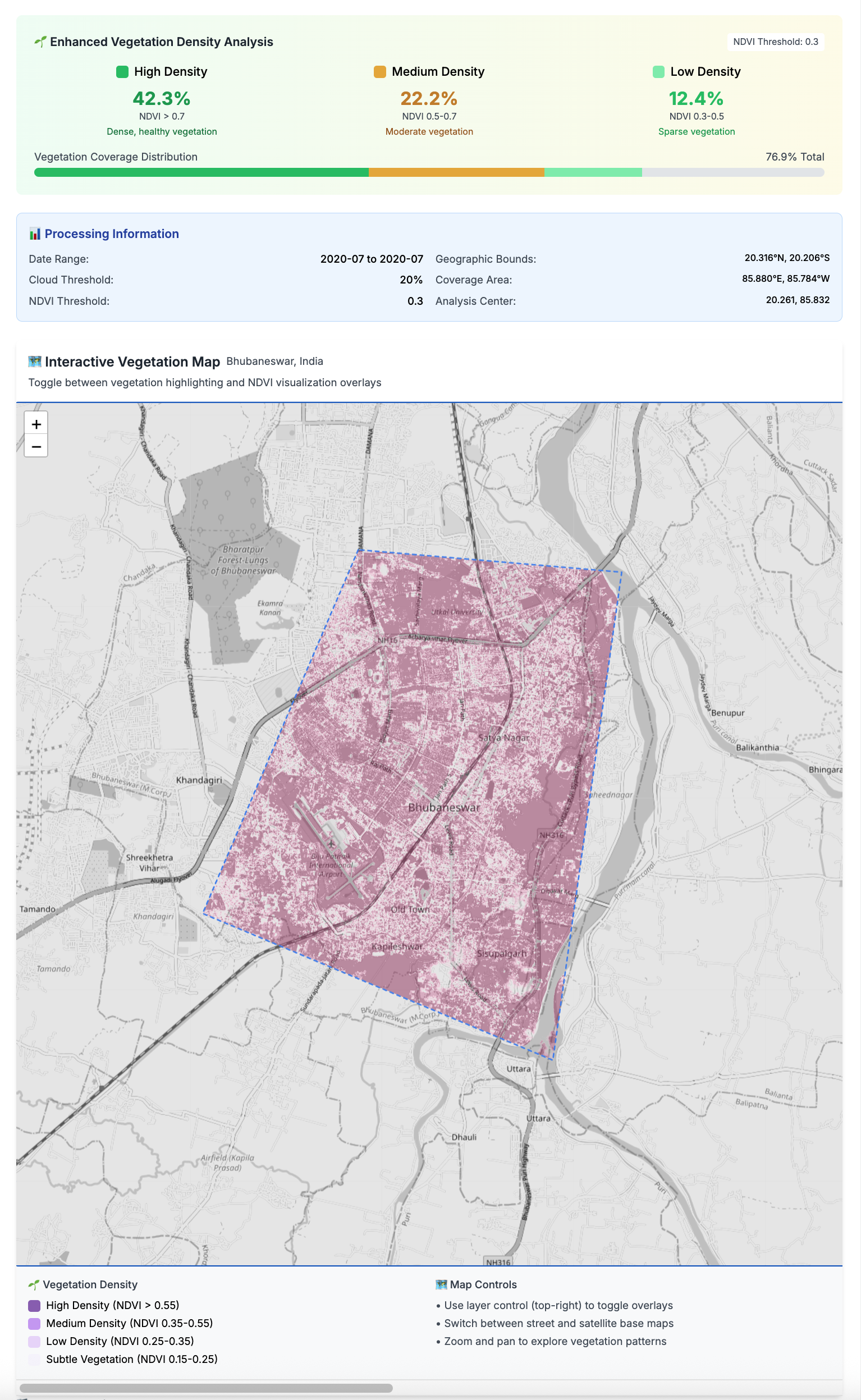
Ever wondered how to uncover hidden patches of greenery in your city without wrestling with API keys or complex satellite data pipelines? That’s exactly what the greenspace-detection-platform is all about. Born from a clever mix of Next.js, Python, STAC, and Sentinel-2 satellite data (via the Microsoft Planetary Computer), this tool delivers beautifully aligned, key-free vegetation analysis, boosting detection by a whopping 46% compared to standard methods GitHub.
What’s particularly fun is how it brings everything to life: you pick your city (Toronto’s even on the list!), tweak sensitivity and date range, and watch the platform render a purple-gradient map showing dense forests, parkland, grass, and subtle green hints—all geo-aligned to sub-pixel accuracy and ready to toggle between grayscale, OSM, or satellite views GitHub. Under the hood, sub-pixel precision and smart CRS transformations ensure images align perfectly, while Leaflet, OpenCV, and Rasterio stitch it all together in the frontend and backend.
Whether you’re a hackathon pro or just curious about urban ecology, this is a seriously cool project to play with—or build on. Installation is a breeze with npm install, npm run setup, and then launch with npm run devGitHub. You’ll be inspecting greenness in your favorite city in just a few clicks—perfect for anyone with an eye for code and a soft spot for nature.
Batch Your City Data with Ease – made using Cursor AI!
My team is using Veraset’s mobile ping data to help city administrators improve quality of life in their cities. This tool, https://github.com/main-salman/mobility-data-lifecycle-manager, let’s you manage the download of data from Veraset (if you are their customer and have an API key from them).
This open-source tool lets you:
Select cities and areas of interest (AOI) via a slick web UI
Schedule or manually trigger batch data syncs from Veraset
Run multiple API endpoints in parallel (think: pings, trips, cohort, aggregate, and more)
Organize everything by country, state, and city in your S3 bucket
Monitor progress and logs in real time
It’s built for researchers, analysts, and data engineers who want to automate and scale their mobility data workflows—no more manual downloads or one-off scripts.
A record for example.org pointing to your EC2 instance’s public IP
MX records for email routing
SPF, DKIM, and DMARC records for email authentication
Any other required records for your services
Best Practices
Keep a backup of your DNS records
Document all changes.
Set up DNS monitoring in AWS Route 53
Consider setting up DNS failover if needed
Use AWS Route 53’s health checks for your services
Cost Considerations
AWS Route 53 charges:
$0.50 per hosted zone per month
$0.40 per million queries for the first billion queries
Additional costs for health checks and routing policies
Security Considerations
Enable AWS CloudTrail to log all Route 53 API calls
Use IAM roles and policies to restrict access to Route 53
Consider enabling DNSSEC for additional security
Monitoring and Maintenance
Set up CloudWatch alarms for DNS health
Regularly review DNS records
Keep track of DNS changes in your history.txt
Monitor DNS propagation times
Would you like me to provide more detailed information about any of these steps or help you with setting up specific DNS records for your email server?
Easiest way to install MCP Servers/Agents in Cursor.
What’s an MCP Server? 🤔
Think of MCP servers as your AI assistant’s superpowers. They’re like plugins that give your Cursor IDE extra abilities – from running Docker containers to searching the web, all without leaving your editor.
Update: As of September 2025, I am sad to report that I went back to Gmail. The search functionality in Proton Mail was not sufficient for my day-to-day work requirements. Hopefully I’ll go back to Proton mail in the future when search funcionality is better.
Why Leave Google?
Google’s motto has evolved from “Don’t be evil” to “Do the right thing,” but in the recent years, the company has abandoned these principles entirely. Through Project Nimbus, a $1.2 billion contract with the Israeli government, Google and Amazon are providing cloud computing and AI technology that directly supports Israel’s ongoing genocide in Gaza and apartheid regime in Palestine. Despite protests from their own employees, Google has chosen to:
Provide AI and cloud infrastructure enabling Israel’s military ongoing genocide
Suppress internal dissent and fire workers who speak out
Continue profiting from human rights violations
Enable surveillance and targeting systems used against Palestinian civilians
This is just one example of Google’s increasing complicity in human rights violations. For those who value privacy, human rights, and ethical technology, migrating away from Google’s ecosystem is an important step.
Moving from Gmail to ProtonMail? Here’s a simple guide to help you make the transition smoothly.
Why ProtonMail?
ProtonMail offers end-to-end encryption and enhanced privacy features, making it a popular choice for those looking to switch from Gmail. Their data centres are in Switzerland, and your emails, your data, is protected by the laws of one of the most privacy focused countries in the world. The migration process is straightforward, and we’ll guide you through it.
For visual guides, check out these helpful video tutorials:
Complete Migration Guide:
Understanding the Migration Process
The above steps help you migrate your existing emails from Gmail to ProtonMail. However, to ensure a smooth transition without losing any new emails, follow this two-phase approach:
Phase 1: Initial Email Migration
Use the Easy Switch tool as described above to transfer your existing emails
This creates a foundation with all your historical emails in ProtonMail
Phase 2: Gradual Transition
Set up email forwarding from Gmail to ProtonMail (see video below)
Begin updating your email address across various services:
Start with critical accounts (banking, government, work)
Then move to regular subscriptions and newsletters
Finally, notify personal contacts
Monitor both accounts during the transition period
As more services switch to your ProtonMail address, your dependency on Gmail forwarding will decrease
This methodical approach ensures:
No emails are lost during or after migration
You have time to update all your accounts
A smooth transition without disrupting your communication
Setting Up Email Forwarding:
Need Help?
If you encounter any issues during the migration, ProtonMail’s support team is available to help. You can also refer to their official migration guide for detailed instructions.
Remember to take your time with the migration process to ensure all your important emails and contacts are properly transferred.
Further Reading
For more information about Google’s involvement in human rights violations and why many are choosing to leave Google’s ecosystem:
Building an Urban Mobility Dashboard with AI as Your Thought Partner
I wanted to share something cool I built this morning – an Urban Mobility Dashboard that helps city planners visualize and analyze mobility patterns using Google Maps. What’s even cooler? I built it in just 60 minutes with the help of Cursor AI!
About the Dashboard
The dashboard lets you:
Select different cities (Vancouver, Madinah, Delhi, Lahore) or search for any location
View simulated crowd density using heatmaps
Analyze cultural sites and specific areas with interactive markers
Compare day/night activity patterns
View key mobility statistics like peak hours and estimated visitor counts
It’s built with Next.js, TypeScript, Tailwind CSS, and the Google Maps API – a modern stack that makes it responsive and user-friendly.
Here’s the real game-changer: I made a 12-minute video showing how I used Cursor (or any AI coding assistant) not just as a code generator, but as a true “thought partner” in development.
Instead of the typical approach of asking AI to fix small issues with individual prompts, I had an actual conversation with it to tackle bigger challenges. The key was prompting the AI to ask me questions and then answering those questions to guide the development process.
The first 2.5 minutes of my video showcase the finished app (which took just 60 minutes to build), while the remaining 10 minutes (condensed from 35-40 minutes of actual work) demonstrate the specific prompts and workflow I used.
Why This Approach Works
When you use AI as a thought partner:
You can tackle complex projects much faster
The AI helps you think through architecture decisions
You avoid getting stuck on implementation details
The back-and-forth conversation creates a more coherent codebase
The next time you’re starting a project, try treating your AI assistant as a thought partner rather than just a code generator. Ask it big-picture questions, let it suggest approaches, and have it ask you clarifying questions. You might be surprised at how much more productive you become!
When managing AWS infrastructure, it’s often crucial to have a clear overview of all IP addresses and endpoints within your Virtual Private Cloud (VPC). With literally just one simple prompt, Cursor created a helpful bash script that provides a comprehensive view of all network-related resources in a VPC.
This video covers whiteboarding for IT Professionals using Drawing Tablets. It is particularly focused on IT professionals such as, but not limited to: Cloud Engineers, DevOps Engineers, Network Engineers, Developers, DB Administrators, IT Architects, and virtually all other IT professionals. Using drawing tablets combines the best of digital and analog whiteboarding. Give this method a try – you may find that doing so will take your whiteboarding to the next level, improve business and customer outcomes, save you time, and at the same time, help you better establish yourself as an expert or trusted advisor in front of your colleagues or customers.
This Terraform based solution automatically sets retention periods for CloudWatch Log Groups as they’re created across your entire AWS organization. No more manual cleanup or forgetting to set retention periods! Just deploy it once in your management account and forget about it. Made this solution in about 8 hours thanks to Cursor – The AI Code Editor !
Asking ChatGPT and DeepSeek.ai (DieticienGPT?) about what diet is best for reducing Cardiovascular Disease – just want to store it here to keep it handy:
Here was the prompt:
can you please provide list of 10 meta analysis studies in a table that show what the best diet is for reducing cardiovascular disease? please include publication date, authors, journal, title of the study and summary of the studies. Please also include low-carb diet meta analysis. Please also include the URL for each study in the table as well. Only focus on studies that talk about cardiovascular disease as the main target of their analysis.