Terraform with Cisco ACI – Demo

My Ansible demonstration video was 47 minutes long. In this video, which is 11 minutes long, I demonstrate how you can use Terraform to configure Cisco ACI. That 47 vs 11 min difference sums up the difference in complexity between Ansible and Terraform. Although Ansible offers many more knobs, it’s also significantly more complicated. It’s also hard to hit the ground running with Ansible. Also all the changes in the last couple of years have not helped either in terms of complexity. Terraform on the other hand, relative to Ansible, is SIMPLE. I LOVE TERRAFORM. It’s easy. It’s powerful. It’s flexible. It’s awesome. Watch the video below and see for yourself.

This video shows how you can use Terraform to configure ACI – and implement infrastructure-as-code (IAC). The demo crates a tenant, application profile and three EPGs. The video is meant to demonstrate how easy it is to use Terraform to configure ACI vs other options like Ansible, Python, CLI or GUI.

Repository used (Configuration):

https://github.com/main-salman/terraform-aci

Recommended Terraform Training:

https://udemy.com/course/terraform-beginner-to-advanced/learn/ – This is an awesome course

https://udemy.com/course/terraform-associate-prep-course/learn/ – This is a good supplementary course if you want to also get Terraform certified

Ansible Network Automation – Quick Start: Backup and Batch Command Output

So, in the last couple of years (between 2020-2022), Ansible has changed significantly, with the introduction of Collections, and a number of older commands either already deprecated or slated to be deprecated.

Some core Ansible files such as hosts.ini are also to be deprecated and replaced with YAML equivalent instead (i.e. hosts.yml – or whatever else you want to name it). Further, Ansible is also encouraging administrators to use “connection = network_cli” for network automation instead of “connection = local” that the network geeks were using prior to 2020, and a number of other changes.

All of this has resulted in playbooks that look significantly different than before. All of this is a GOOD change – this will make Ansible scale better and ultimately be an even more awesome tool – but it is also a bit of a hassle to update playbooks.

So, how can you get started with Ansible Network Automation in 2022, without having to reference old and outdated playbooks that don’t work with newer versions of Ansible (2.9 and later) anymore? I got a video and a Github repository for you showing step-by-step on how to get started!

Convert SuperPutty sessions.xml file into hosts file output

The sessions.xml file that my team uses has 1400 entries! Kinda insane. This little script converts SuperPutty sessions.xml file into output that can be copy/pasted into hosts file. I needed a way to quickly copy content from the sessions file into a hosts file so that I can automate some of the configuration using Ansible (DNS is not an option in my environment)

https://github.com/main-salman/SuperPuttySessionsXMLtoHostsConverter

Usage

python SuperPuttySessionsXMLtoHostsConverter.py

The above script assumes that the SuperPutty sessions.xml file is in the same directory as the script. Outputs hosts.txt and also prints output, so you can copy/paste output from either source into your hosts file.

More to come in the next post!

India is going down the same road as Pakistan’s fundamentalist past

I visited both India and Pakistan in 2007. At that time, I wished Pakistan was more like India – secular, pluralistic, and accepting of minorities. Now I wish for the opposite – because India has taken a complete u-turn, while Pakistan has been slowly progressing.

Since the advances of #BJP #Hindutva government in the last several years, India has taken a u-turn, and minorities are being oppressed, while Pakistan, which has a LONG way to go, has made improvements in the lives of minorities.

In 2007, there was a day and night difference between the two. Pakistan was full of sectarian violence, crime, and full of stories of minorities being oppressed. In India, I visited my friend who belonged to a minority, and I was so happy to see that he could practice his faith safely and openly. Now, I no longer have any desire to even visit India anymore – it’s become like the violent and oppressive Pakistan of the 80s and 90s – and continuing to further go down that road.

I wish Indians would look at Pakistan of the 80s and 90s as a cautionary tale to learn from – but it seems that the #BJP #Hindutva government is hell bent on repeating the same mistakes as Pakistan, and leading itself to more death and destruction at it’s own hands. In India, the #hindutva #bjp fundamentalist are taking it down the same bloody road that Pakistani fundamentalist have already taken Pakistan through in the past.

Convert Excel Documents into Diagrams! With Video!

Do you need to keep track of all the interfaces that your systems connect to? And also have them available in diagram form? You can use the ExcelToNetworkDiagramConverter (E2NDConverter) Python script to create Scalable Vector Graphics (SVG) files which can be imported directly into Visio and further manipulated directly in Visio as required. This method, of converting an Excel to a Network Diagram can save you hours and hours of work by simply defining in Excel what device and ports you want connected, and having them show up in diagram format!

As a bonus, you can also keep track of Serial Numbers, IP addresses, device Location and any other asset information that may be specific to your organization, which is built-in to the diagram and Excel file for easy tracking and documentation.

Following up on my previous post, here is a video which outlines how to use Excel to Network Diagram Converter! Enjoy!

Convert Excel Documents into Diagrams!

I got something super exciting to share!

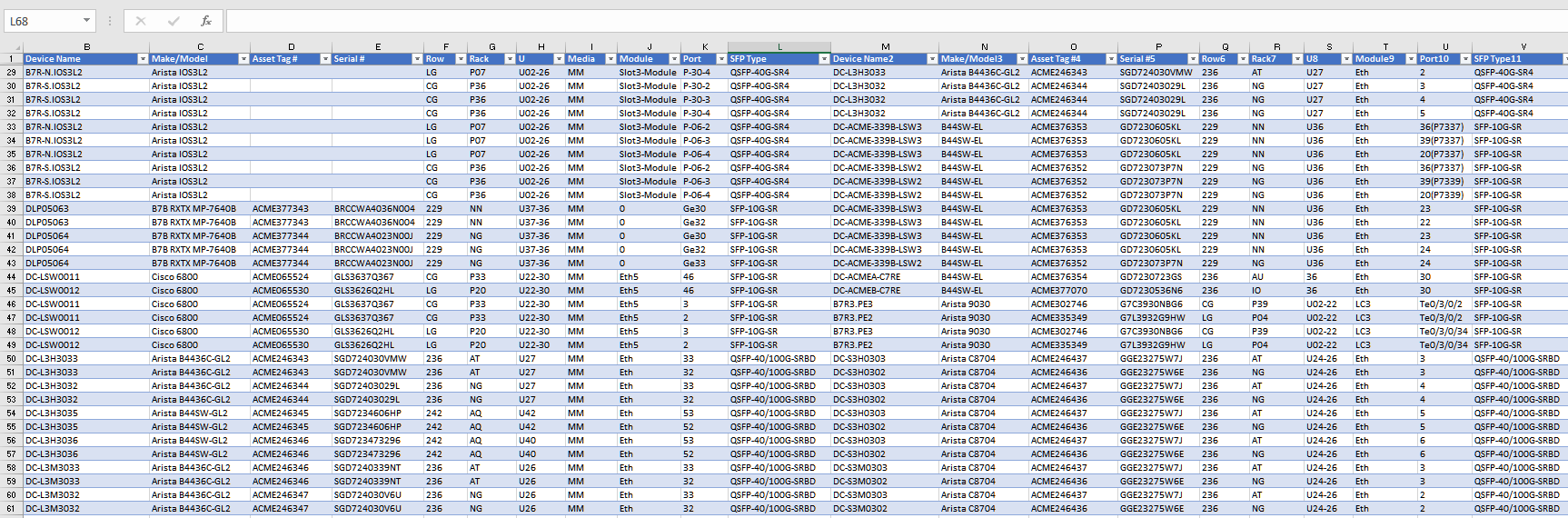
I worked with a super smart developer, Roman S, to make a tool to convert Excel files detailing connectivity information into diagrams! Yes, that’s right – convert your Excel files into network diagrams! Roman did all the intelligent work – I just provided the ideas, made minor modifications, and added a handful of minor features to the brilliant Python script he created.

It converts input like the above Excel connectivity information into a nice diagram in SVG format, like the one below. You can convert the above Excel file using just one command from the Excel-to-Network-Diagram-Converter (E2NDConverter.py) script in less than a minute! SVG format can be natively imported into Visio for further manipulation.

I will follow up with a video – as there are many more features in this tool that are SUPER useful. Enjoy!

End Israeli Apartheid

Sample of counties unhappy with #amnesty reporting their human rights abuses: China, Saudi Arabia, Syria, Myanmar, Iran, Russia… + Israel.

#amnestyinternational is an equal opportunity truth teller when it comes to human rights abuses. It doesn’t take sides. Not with Iran or Saudi. Not with USA or Russia. Not with Hamas or Israelis. It always relentlessly sides with human rights of all humans.

Hopefully the truth about Israeli apartheid that many are finding uncomfortable results in reflection rather than blanket attacks and baseless demonization of Amnesty International. Attacks on a human rights organization like Amnesty are cowardly and ignorant, and accusation of bias only end up showing how weak Israel’s position really is when it comes to human rights abuses. Any refutation of the Israeli apartheid report should be based on facts, not baseless accusations of bias.

Consider donating to support Amnesty’s selfless pursuit of human rights of every human being on Earth:https://www.amnesty.ca/

How to get books, websites, and other documents read out loud to you from your Android phone and PC

Four years ago, I posted a video with instructions on how to get your Android phone to read PDF files to you. That video was out-of-date, so now here is an updated version, with bonus content, so in addition to getting your Android phone to read PDFs, you can also get your computer to read almost any document via Chrome and Microsoft Edge. Enjoy!

The app mentioned in the video is available here:
https://play.google.com/store/apps/details?id=udk.android.reader&hl=en_CA

FREE PluralSight.com courses for April 2020!

PluralSight.com is an awesome IT training website with TONS of great quality Cloud, Systems, Process, Programming and Networking courses. They have an amazingly generous offer of making ALL their courses free for the month of April 2020! Now that’s AWESOME leadership by an IT teaching organization.

https://www.pluralsight.com/

Simply go to their site, make an account and start learning!

Also, as noted in previous blog posts, if you don’t know what to learn, LEARN ABOUT CLOUD! Go through Azure and AWS courses. Even in the crazy COVID-19 situation, with record unemployment, CLOUD professionals are STILL IN HIGH DEMAND!

Create a free website or blog at WordPress.com.

Up ↑